Camera Frame Overlays — camcorder REC, CCTV, binoculars, night vision: 24 seamless transparent loops, WebM/Ren'Py/PNG
A downloadable asset pack
Show your scene through a camcorder, a security camera, binoculars or night vision. Eight camera-screen frames as seamless transparent loops you lay over your scene.
Contains blinking. The red recording dots and the word PAUSE blink once a second, and night vision shifts its green tint every half second. The README gives measured numbers for every file.
What it is
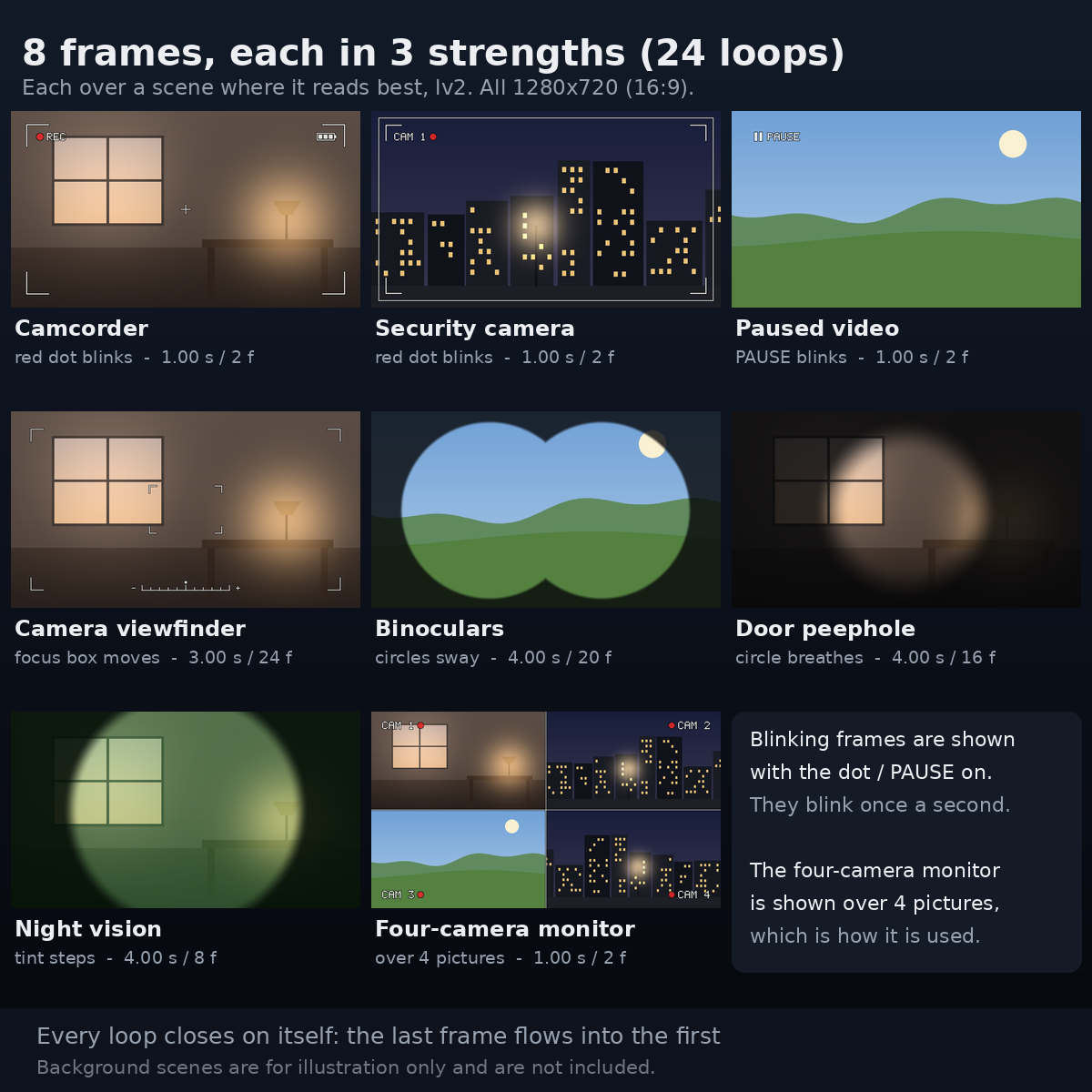
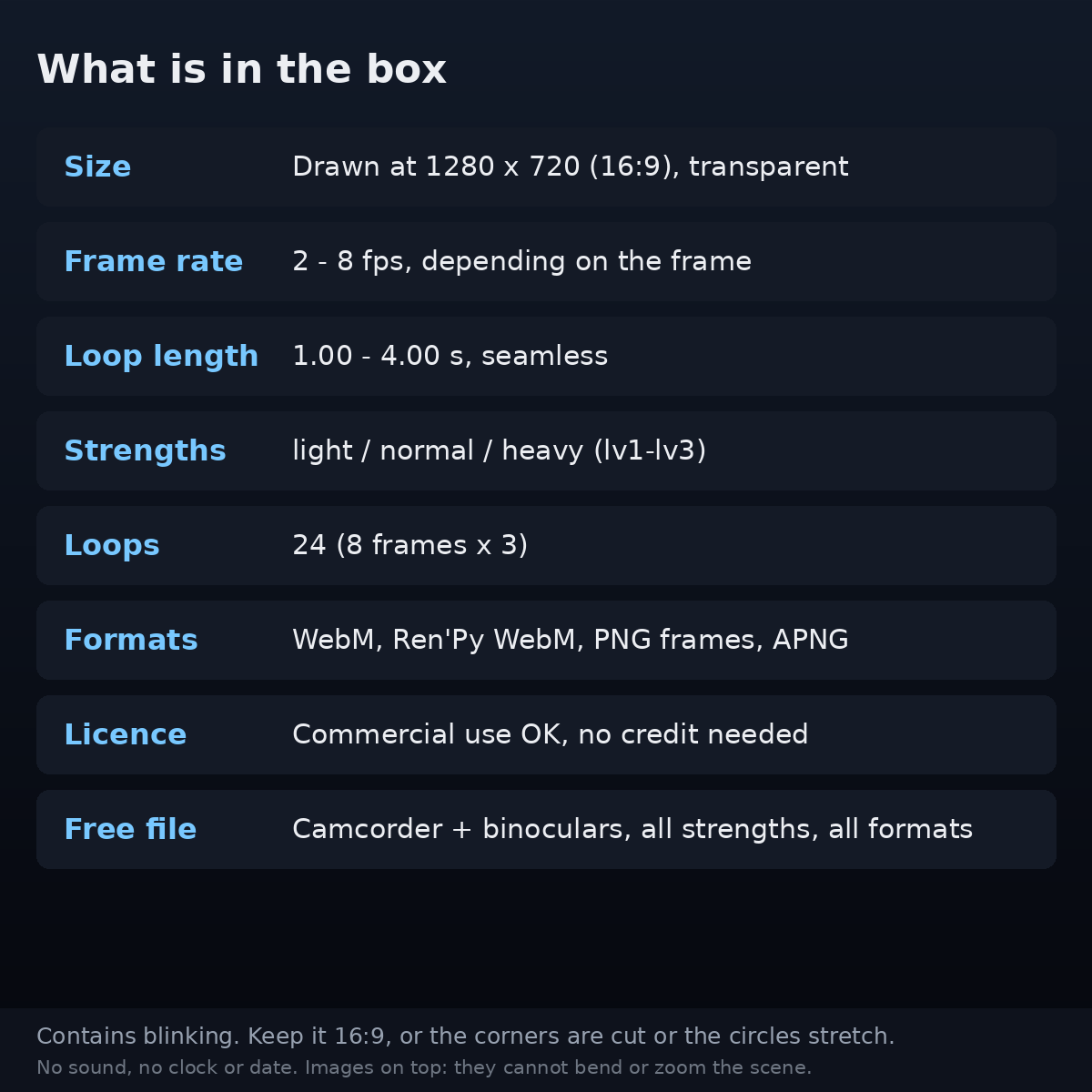
Eight frames that say "what is filming this": a camcorder recording screen, a security camera, a paused video, a camera viewfinder, binoculars, a door peephole, night vision and a four-camera monitor. Each comes in three strengths - light, normal, heavy - so there are 24 loops, all drawn at 1280 x 720 (16:9) with a transparent background.
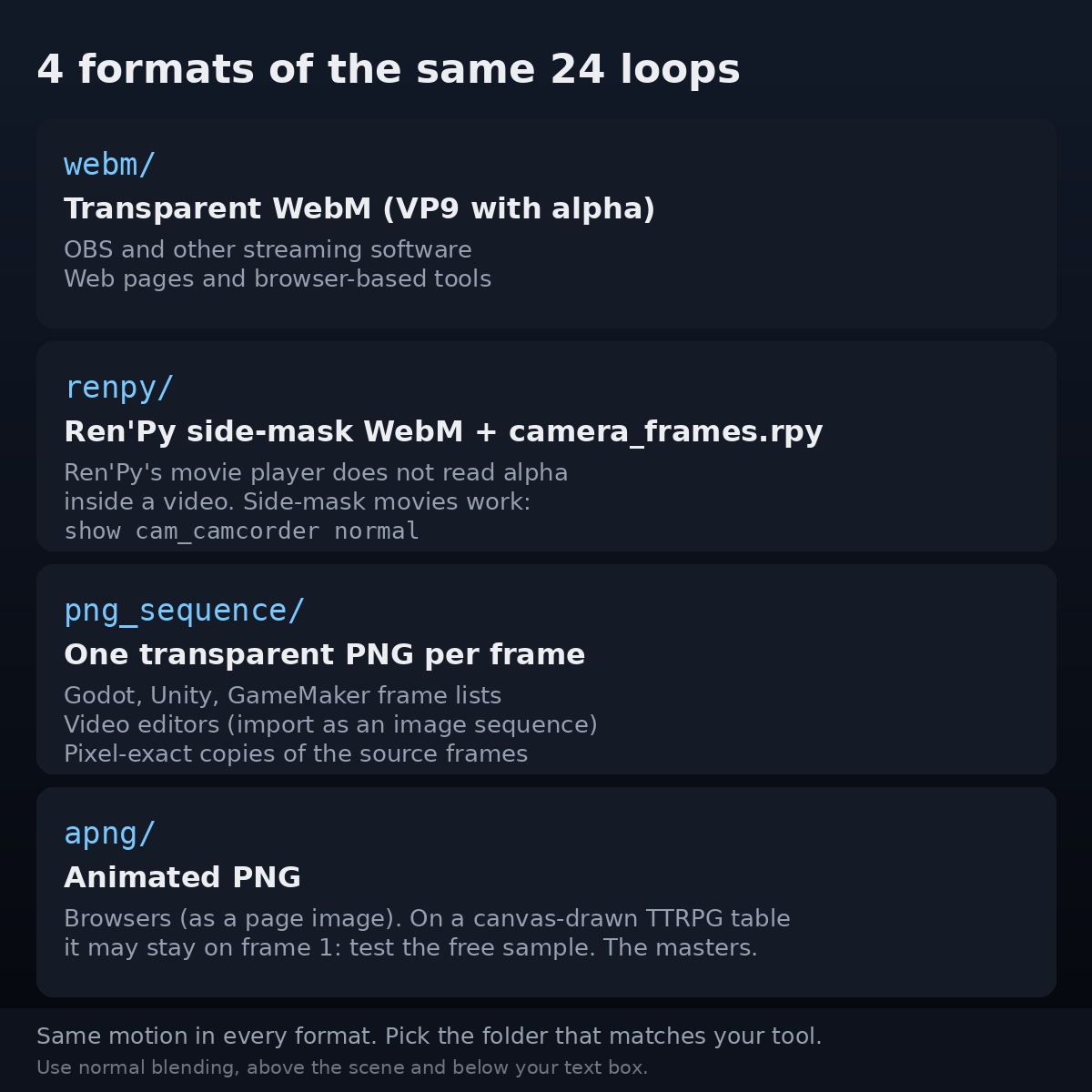
Every loop comes in four formats, so it drops into the tool you already use:
- Ren'Py - side-mask movies plus a ready-to-paste
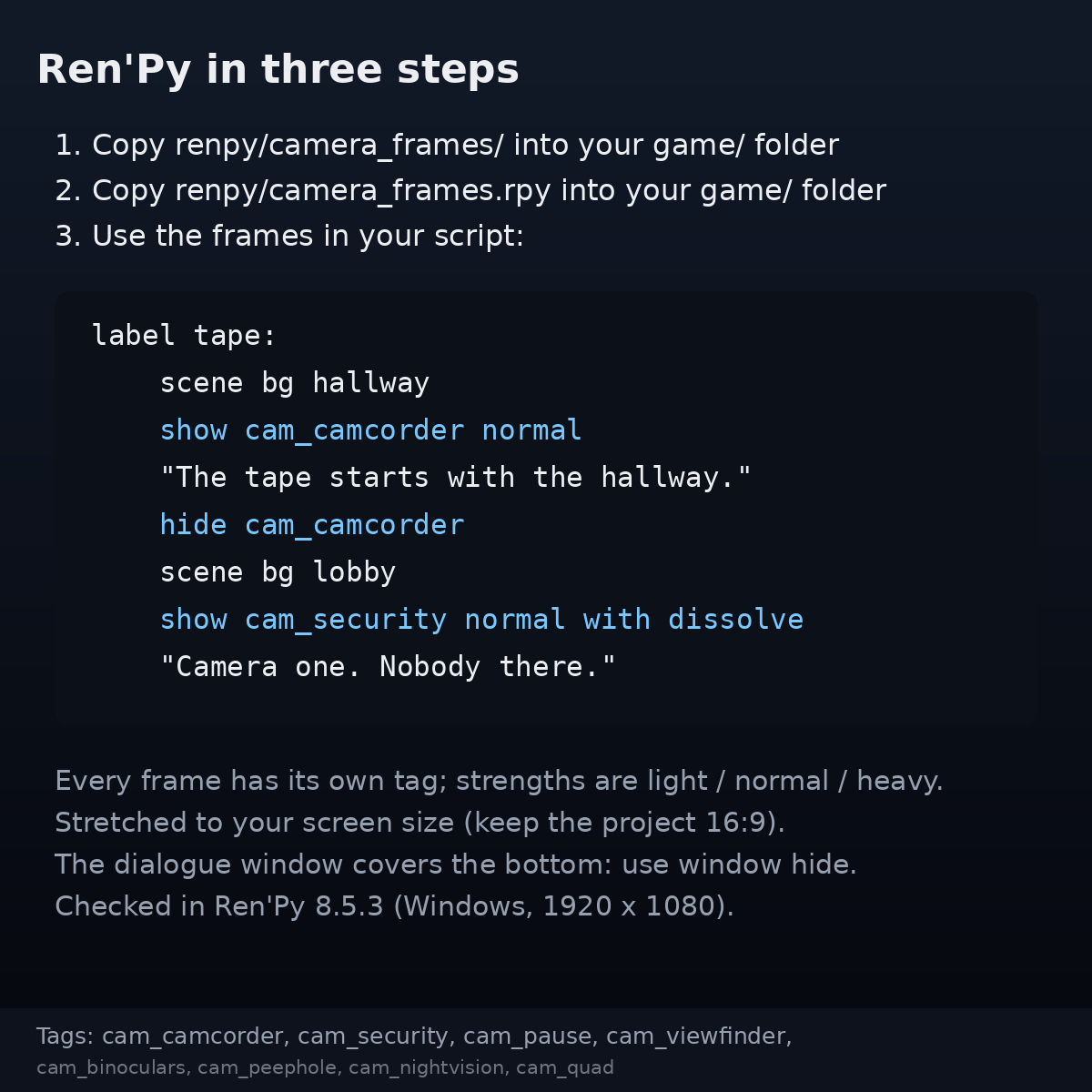
camera_frames.rpy. Ren'Py's documentation says its movie player does not support alpha inside a video; side-mask movies are the format it does support. The definitions stretch each loop to your project's screen size, so it is justshow cam_camcorder normal. - Transparent WebM (VP9 with alpha) - for OBS and other streaming software and for web pages.
- PNG frames - one transparent PNG per frame, for Godot, Unity, GameMaker, any frame list, and video editors.
- APNG - the original masters, for browsers and for browser TTRPG tables that play APNG. Many tables draw on a canvas, where an APNG may stay on its first frame (the blinking dot then stays on) - test the free sample on your table first.
When you would use it
- Found footage and horror: the tape the characters find, a security feed of an empty corridor, a door peephole at night
- Visual novels: a recording scene, a stake-out through binoculars, a night-vision search, without redrawing a single background
- TTRPG sessions on a shared screen: put the frame on the foreground layer when the players watch the footage
- Streaming and video: a "recording" look for a story segment, a paused-tape title card, a four-camera monitor wall
What it does
- Moves, without a visible seam. The red dots blink (on half a second, off half a second), PAUSE blinks, the viewfinder's focus box closes in and opens out, the binocular circles sway like hand-held binoculars, the peephole slowly breathes, and night vision's tint steps slightly stronger and weaker every half second. For every file and every format, the jump at the loop point is no more than 1.1 times the largest change between two frames inside the loop.
- Keeps the middle clear. The line-and-text frames draw only near the edges, plus a small cross (camcorder) or focus box (viewfinder) in the middle, so your scene and characters stay visible. The README gives the measured share of the middle each one covers.
- Readable on any scene. Every white line and letter has a 2-pixel dark outline, so REC, CAM and PAUSE read on bright and dark scenes alike.
- Measured blinking, including what averages hide. Averaged over each sixteenth of the screen, one frame never changes by more than 2.8% of full brightness - but that is a coarse average: within a small area the word PAUSE changes its small area by up to 19.4%. The README lists all three measures for every file.
- Three strengths. Swap
light/normal/heavyinstead of fiddling with opacity. - Layers with Screen Texture Overlays. Same size, same three strengths, same naming: scanlines under the security camera for a CCTV feed, film grain under night vision. (The textures are a separate product and are not included.)
- Commercial use, no credit needed. Ship it in a paid game, earn from a stream. Do not redistribute the files, and do not pass fake footage off as a real recording (
LICENSE.txthas worked examples, including found footage and ARGs).
- Camcorder — Loop: 1.00 s · Frames: 2 at 2 fps
- Security camera — Loop: 1.00 s · Frames: 2 at 2 fps
- Paused video — Loop: 1.00 s · Frames: 2 at 2 fps
- Camera viewfinder — Loop: 3.00 s · Frames: 24 at 8 fps
- Binoculars — Loop: 4.00 s · Frames: 20 at 5 fps
- Door peephole — Loop: 4.00 s · Frames: 16 at 4 fps
- Night vision — Loop: 4.00 s · Frames: 8 at 2 fps
- Four-camera monitor — Loop: 1.00 s · Frames: 2 at 2 fps
What it does not do
- No guarantee about flashing light. We have not tested how these loops affect people who are sensitive to flashing light, and we make no promise about it. The README says which frames do not blink.
- It cannot bend or zoom the picture underneath. These are images laid on top: the peephole has no fish-eye distortion and the binoculars do not magnify. Night vision lays green over the picture; it cannot turn it into real night-vision greyscale.
- No clock, date or recording timer. A clock inside a loop would jump back at the end of every loop. Add one with your own tool's text.
- The text cannot be changed. The only words are REC, CAM 1-4 and PAUSE.
- No sound. Picture only.
- Only for 16:9. On a 4:3 or other shape the circles become ovals or the corner text is cut off.
- Checked in Ren'Py 8.5.3 at 1920 x 1080 only; not tested in OBS. On Windows, lint passes and each of the eight frames (at heavy) is drawn where the master draws it, stretched to the whole screen. Other screen sizes were not tried, and we have not run the loops in OBS. Try the free sample in your tool first.
- The four-camera monitor is not for a single scene. Its dividing cross runs through the middle of the screen; it is made to sit over four pictures (the README shows how).
How to use it
- Download the free sample first (the camcorder and the binoculars, all strengths, all formats) and try it in your tool.
- Open the folder for your tool:
renpy/,webm/,png_sequence/orapng/(the README has a table). - Put the frame above your scene and below your text box, with the normal blend mode - as a Ren'Py
show, an OBS Media Source, a foreground image on your TTRPG table, a frame sequence in your video editor, or a frame list in your engine. - Keep the frame 16:9 and choose the strength:
lv1light,lv2normal,lv3heavy.
Easy things to get wrong
- 24 loops = 8 frames x 3 strengths, not 24 different frames.
- Keep it 16:9. Show the frame in a 16:9 area (1280 x 720, 1920 x 1080). If your table counts in grid squares, use a multiple of 16 across and a multiple of 9 down (with 24-pixel squares: 32 x 18, 48 x 27 or 64 x 36). Otherwise the frame is stretched or its corners are cut off.
- Keep it below your text box. Over a dialogue window, lines and dark areas cover the words. In Ren'Py the dialogue window covers the bottom of the frame; use
window hidefor a full shot. - No blend modes needed. Use normal blending; the files already contain their colour.
- APNG is not GIF. Many image viewers show only the first frame; a blinking frame that does not play shows its dot on all the time. Browsers play it as a page image; a tool that draws it onto a canvas may not - that includes many browser TTRPG tables, so test the free sample on yours.
- Video editors: start with the PNG frames. Many editors do not read VP9 transparency and show a black background. If you convert the WebM with ffmpeg, decode it with
-c:v libvpx-vp9, or the transparency is dropped.
What you need
- Ren'Py: checked in 8.5.3 (Windows, 1920 x 1080). Side-mask movies are described in the Ren'Py documentation.
- OBS Studio: according to the OBS Studio 17.0.1 release notes, a Media Source reads transparent WebM from that version on. We have not tested OBS ourselves - try the free sample.
- Everything else: anything that opens PNG, APNG or WebM (VP9). Every master is built the same way, so a tool that reads the free sample reads the full pack the same way.
Made by ASTERISM. 1280 x 720. 24 loops, about 14 MB unzipped (the free sample is about 4 MB).
Download
Click download now to get access to the following files:
Leave a comment
Log in with itch.io to leave a comment.