Measured Noise — 60 tiling greyscale masks, measured
A downloadable asset pack
Most noise packs tell you how many files are in them. This one tells you what is in each file: the tiling measured on the delivered pixels, the settings that made it, and the brightness range it shares with every other file in the pack.
What it is
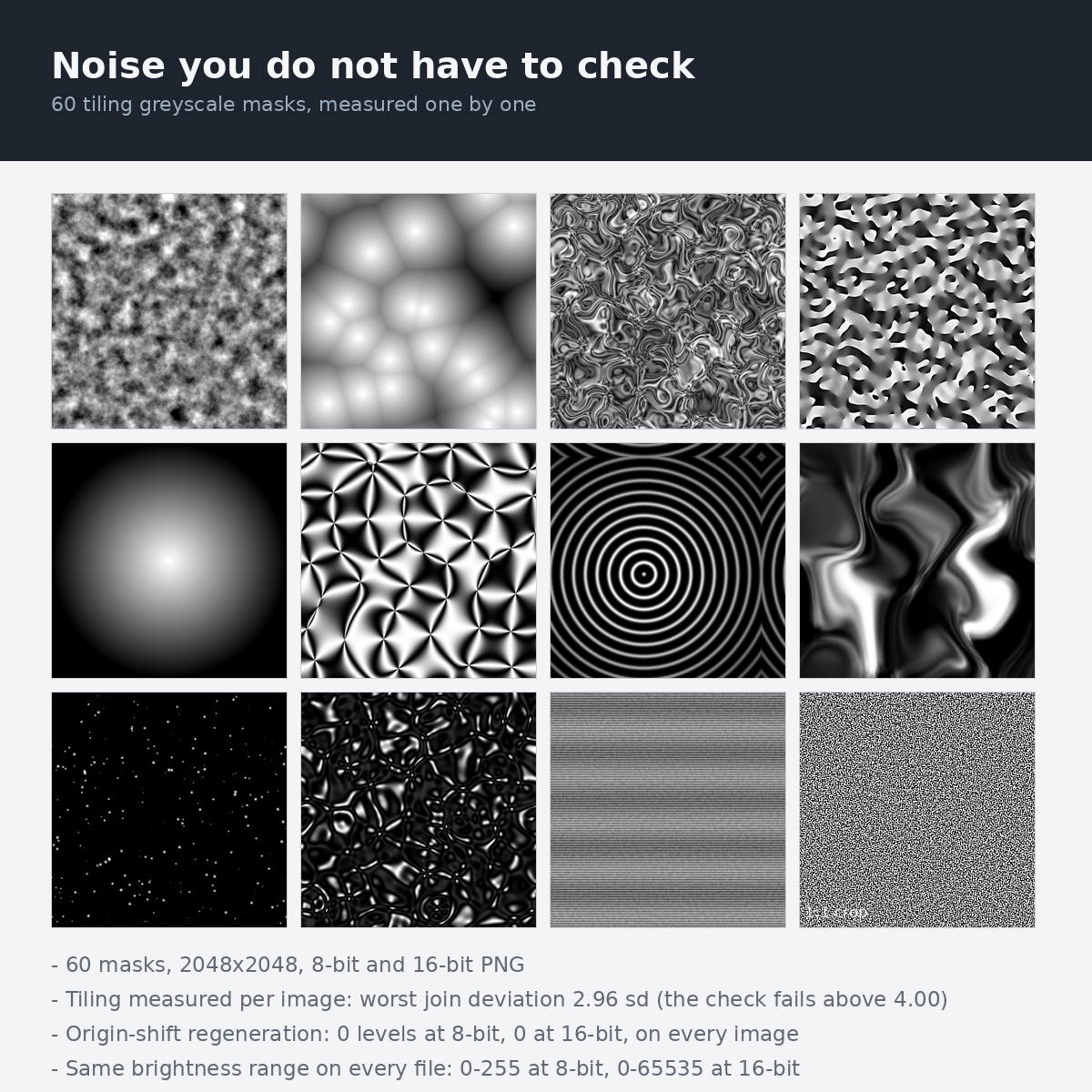
60 tiling greyscale masks for particle systems and shaders, at 2048 x 2048, in 8-bit and 16-bit PNG.
Every file is procedurally generated - written by code from noise functions and geometry, with no external datasets, no photographs, no scans and no third party artwork anywhere in the pipeline.
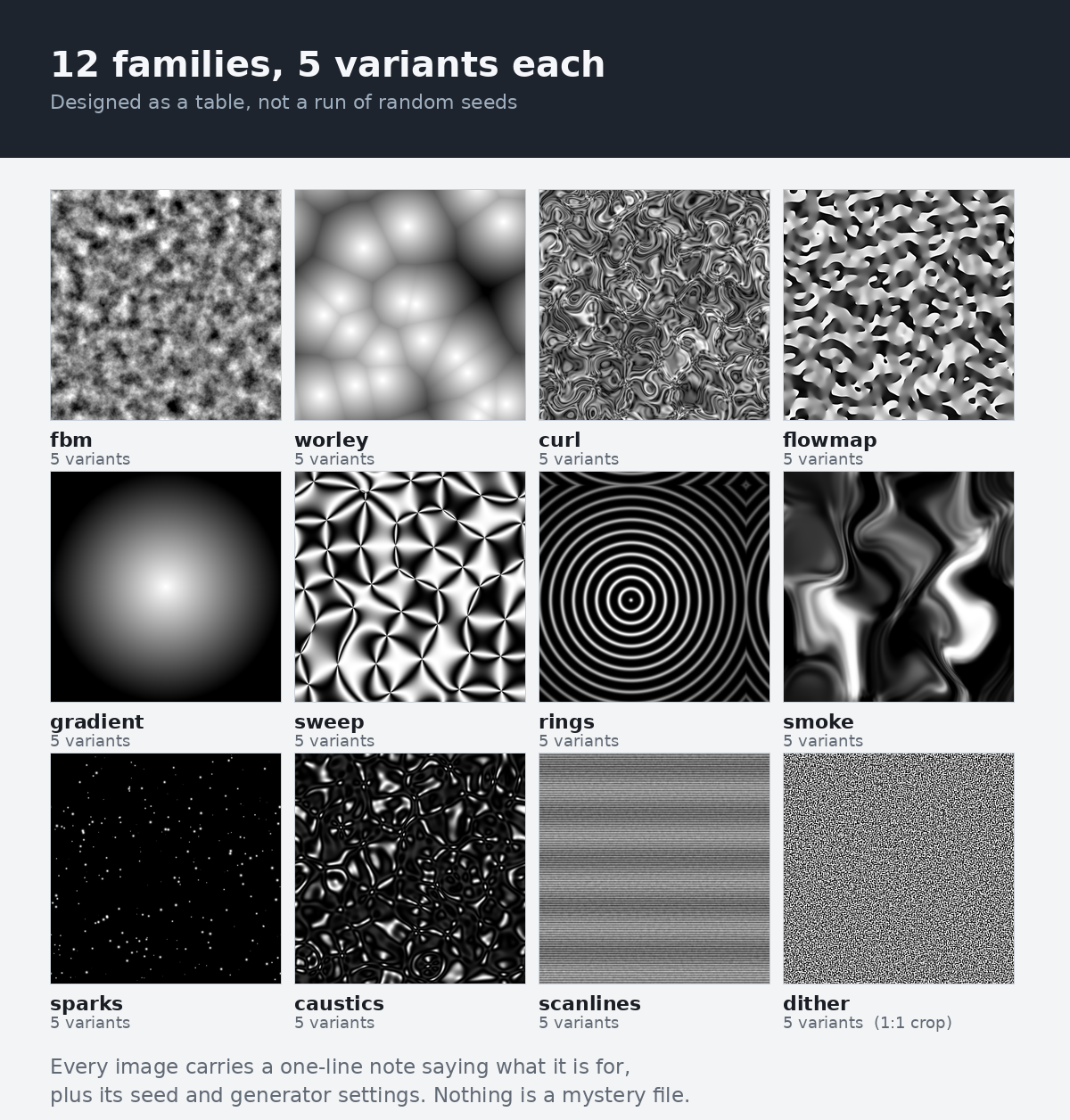
The 60 images are 12 families of 5 variants, not a bag of random output. Each variant exists for a different job, and the pack says what that job is, one line per image.
fbm— Images: 5 · What it is: Layered value noise. The general-purpose cloud / dissolve base. · Worst join deviation: 2.15 sd · 16-bit levels: 65,017-65,536 · Worst threshold error: 18.4%worley— Images: 5 · What it is: Cellular (Voronoi) fields. Cells, scales, cracked boundaries. · Worst join deviation: 1.43 sd · 16-bit levels: 24,223-65,483 · Worst threshold error: 36.9%curl— Images: 5 · What it is: Curl-flow speed. Swirling filaments that read as motion. · Worst join deviation: 2.07 sd · 16-bit levels: 65,208-65,451 · Worst threshold error: 22.7%flowmap— Images: 5 · What it is: Single-channel flow direction. Grey = angle in turns; 0 and 1 are the same heading. Point sampling, no mips. · Worst join deviation: 2.63 sd · 16-bit levels: 16-65,536 · Worst threshold error: 2.6%gradient— Images: 5 · What it is: Radial and distance falloffs that reach 0 inside the frame. Soft particle masks, vignettes. · Worst join deviation: 2.96 sd · 16-bit levels: 1,025-64,669 · Worst threshold error: 67.5%sweep— Images: 5 · What it is: Pinwheel fields with many centres. Swirl masks, rotor blur (not a single-centre clock wipe). · Worst join deviation: 0.91 sd · 16-bit levels: 63,973-65,536 · Worst threshold error: 15.0%rings— Images: 5 · What it is: Concentric rings and shockwaves. Expanding impact. · Worst join deviation: 1.76 sd · 16-bit levels: 63,954-65,505 · Worst threshold error: 48.1%smoke— Images: 5 · What it is: Vertically stretched, domain-warped plumes. · Worst join deviation: 1.42 sd · 16-bit levels: 65,534-65,536 · Worst threshold error: 46.0%sparks— Images: 5 · What it is: Point sprites with falloff. Embers, dust, specks. · Worst join deviation: 1.73 sd · 16-bit levels: 17,259-53,144 · Worst threshold error: 89.6%caustics— Images: 5 · What it is: Interfering warped waves. Water light on a surface. · Worst join deviation: 2.35 sd · 16-bit levels: 62,064-65,531 · Worst threshold error: 79.2%scanlines— Images: 5 · What it is: Scan bands with row displacement. Screens and signal loss. · Worst join deviation: 1.58 sd · 16-bit levels: 63,971-65,502 · Worst threshold error: 18.4%dither— Images: 5 · What it is: Ordered and blue noise, both with flat histograms. Threshold t removes t of the pixels. · Worst join deviation: 2.39 sd · 16-bit levels: 8-65,536 · Worst threshold error: 3.6%
What is different here is not the pictures. It is that you do not have to open them and check. Tiling, bit depth and brightness range are printed per image, measured on the files you receive.
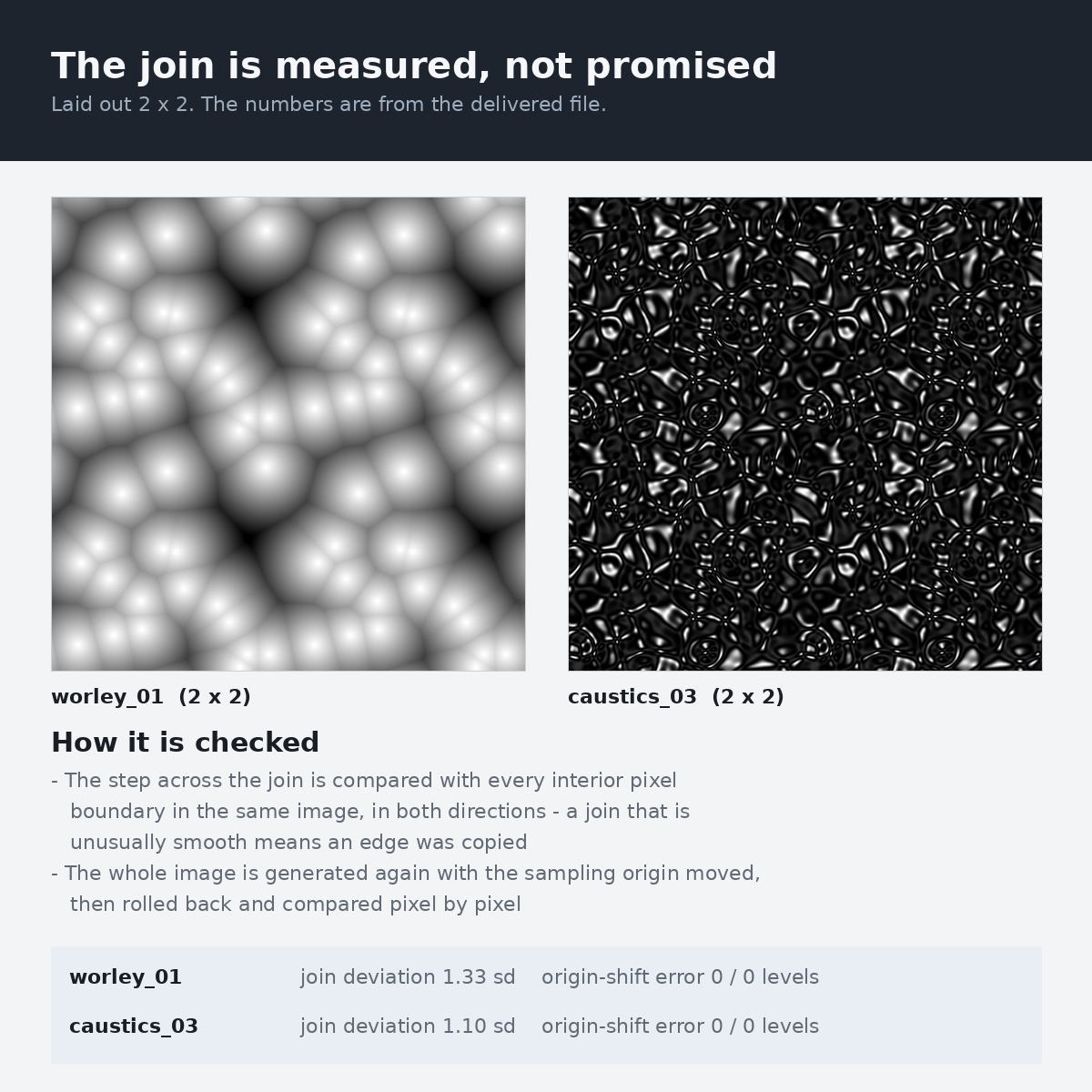
- Origin-shift regeneration: 0 levels of difference on 0 pixels, for all 60 images. Each image was generated a second time with the sampling origin moved along both axes (682 px at build time and 292 px again in the shipping check), then rolled back. The two results are byte-identical at 8-bit and at 16-bit. A pack whose edges were blended or patched afterwards cannot pass this, because shifting the origin moves the join into the middle of the picture.
- The join reads as an ordinary pixel boundary. Comparing the step across the tile join with the 2,047 interior pixel boundaries in the same image, the largest deviation over all 60 images is 2.96 standard deviations (the check fails above 4.00, in either direction - a join that is unusually smooth means an edge was copied).
- Brightness range is identical across the whole pack: 0-255 at 8-bit and 0-65535 at 16-bit, on every single file. Layer any two and they sit at the same level.
- 16-bit really is 16-bit. Distinct grey levels per image run from 8 to 65,536. 56 of 60 images carry more levels than the 8-bit file of the same image can hold; the rest are stepped dither (ordered and quantised blue noise) and quantised flow, which are stepped by design.
- Threshold behaviour is measured too. For a mask you threshold (dissolve, dither), what matters is that cutting at t removes t of the pixels. The list above gives the worst deviation for every family. The
ditherfamily is histogram-equalised on purpose: its full-range files are linear to within 0.2%, and the deliberately stepped ones are limited only by their own grey steps (worst 3.6%, on the file that carries 8 levels by design). Every other family keeps the natural distribution of its pattern, so pick fromditherwhen you need a threshold map. - Every number above and in the per-image table was produced by the shipping check, not typed in. The check measures the delivered PNG files and writes the values into this text; if they drift, the build fails.
When you would use it
- A particle system needs a mask that repeats across a large surface without a visible grid
- A dissolve or erosion shader needs a noise input that stays seamless when the UVs wrap
- A displacement or parallax input needs more than 256 steps, so 8-bit banding does not show up as terracing
- You are layering several masks and need them all to sit at the same brightness level, so one does not quietly dominate
- You want to know a texture tiles before you import it, lay it out 2 x 2 and squint at the join
What it does
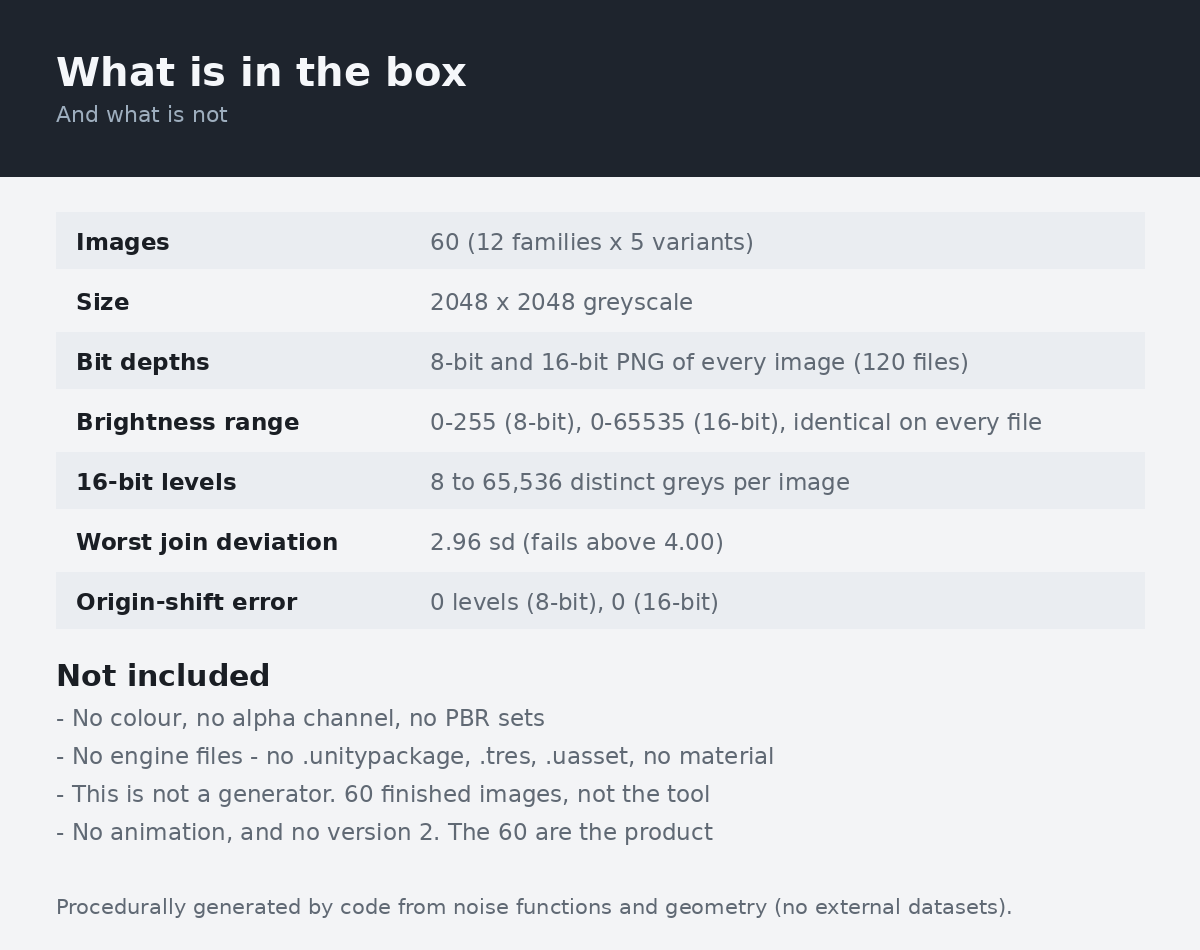
- Images — 60 (12 families)
- Size — 2048 x 2048 pixels, greyscale
- Bit depths — 8-bit and 16-bit PNG of every image (120 files)
- Brightness range — every 8-bit file spans 0-255, every 16-bit file spans 0-65535
- Tiling — seamless on all four edges, measured per image
- Sampler — Repeat on 58 images; 2 centred masks work with Clamp or Repeat (the border is 0 in the 8-bit file and within 0.1% of 0 in the 16-bit file)
- Total size of the images — 316.2 MiB (331,584,388 bytes)
- Colour, alpha, metadata — none - single grey channel, no transparency, no embedded profile
- Both bit depths of every image ship together. Use the 8-bit file where it is enough and the 16-bit file where banding would show. They come from the same generated field, not from converting one into the other
- Each image carries its generator settings: family, variant, seed, frequency, octaves, point counts. Written down, so you can tell two similar-looking files apart without opening them
- Each image has a one-line description of what it is for, so you can pick one without scrubbing through thumbnails
- Nothing to install and nothing to run. Plain PNG files in two folders
What it does not do
Written here because otherwise you will assume it is possible.
- No colour. Every file is a single grey channel. There are no albedo maps, no normal maps, no roughness maps and no PBR sets
- No alpha channel. These are masks as grey values. If your tool needs transparency, put the grey into the alpha slot yourself
- No engine files. No
.unitypackage, no.tres, no.uasset, no material, no shader graph, no sample scene. Two folders of PNG - No RG (two-channel) flow maps. The
flowmapfiles hold the flow angle as one grey channel. The README gives the three-line conversion to an RG vector map, and explains why you want to do it on your side - No flipbooks or sprite sheets, no 3D / volume noise, no 4096 or larger, no normal maps. The README lists this out in full
- No single-centre clock wipe. An angle sweep around one point cannot tile, so there is no such file.
sweepis a field of many pinwheel centres - This is not a generator. You are buying 60 finished images, not the tool that made them, and not the right to make more
- No animation. These are still images. Nothing loops in time
- It will not grow. The 60 are the product. There will not be a version 2 with more, and there will not be patches. That is a design decision, not a promise we later broke
- The measurements describe these files, not your engine. A lossy import setting, an aggressive compressor or a mip chain built with the wrong wrap mode can reintroduce a seam that is not in the file
How to use it
- Download and unzip. You get
8bit/and16bit/, plusREADME.txt,LICENSE.txt,PREVIEW.pngandMANIFEST.json - Open
PREVIEW.pngto see all 60 at a glance, or read the table inREADME.txtto pick by job rather than by look - Copy the file you want into your project. Turn colour space conversion off (these are data, not photographs) and set the wrap mode from the
Wrapcolumn of the table - most want Repeat, the centred masks take either - Use the 8-bit file for opacity, dissolve thresholds and general masking; use the 16-bit file where the value drives geometry or UVs (displacement, parallax, flow offsets)
- Layer masks freely: every file spans the same brightness range, so two of them multiply or add predictably
Easy things to get wrong
- Importing as sRGB. These are data, not pictures of anything. Read them as linear / non-colour, or every value shifts and your dissolve thresholds move
- Leaving the wrap mode on Clamp. The images tile; the sampler has to be told to tile as well, or you will see the edge repeat instead of the pattern
- Expecting the flow maps to be red-green.
flowmapfiles store the flow angle as a grey value: 0 and 1 are both "pointing along +X", and grey 0.25 is a quarter turn. The step from white back to black is the angle wrapping, not a seam in the tile - Filtering a flow map. Sample them with point filtering and no mips, or convert to a two-channel vector map first — averaging grey values across the wrap line gives you the opposite direction. The README measures how many texels this affects and gives the conversion
- Assuming any noise works as a dissolve threshold. Only the
ditherfamily is histogram-equalised, so only there does cutting at 0.25 remove 25% of the pixels. The other families keep the natural distribution of their pattern; the per-image table gives the deviation for every file - Assuming 16-bit always helps. For the ordered dither and the quantised flow variants, the 16-bit file holds exactly the same number of distinct levels as the 8-bit one; those images are stepped by design. The per-image table says which ones
- Compressing to a block format and then judging the tiling. BC/DXT/ETC will change values near the edge. The measurements here are for the PNG
- Scaling to a non-power-of-two size with a filter that does not wrap. Most resamplers clamp at the edge, which manufactures a seam the file does not have
What you need
- Anything that opens PNG. Unity, Unreal, Godot, Blender, After Effects, Photoshop, Krita, GIMP, Substance, TouchDesigner
- 16-bit greyscale PNG support, if you want to use the 16-bit half. Every tool listed above reads it; some older importers silently drop to 8-bit, which is why the 8-bit files ship as well rather than being something you have to convert
- Free disk space for the unzipped pack - the exact size is listed under What it does, measured on the files themselves
- No internet connection is needed, and none is used. No install, no account, no plugin, no runtime
- A free edition is on this page - 3 families, 2 variants each, 6 images in both bit depths. The files in it are byte-for-byte the same files that are in the paid pack, so you can test the exact thing you would be buying
Download
Click download now to get access to the following files:
Leave a comment
Log in with itch.io to leave a comment.